Less setup to repeat
Connect your AI clients in one place. Compatible tools use the same session and task interface.
 AgentRelay
Put the AI you already use to work in your other tools.
Connect Codex, Grok Bot and Antigravity on your computer. Give compatible extensions, apps and workflows one place to send tasks and continue existing conversations.
AI accounts, subscriptions and usage limits still apply.
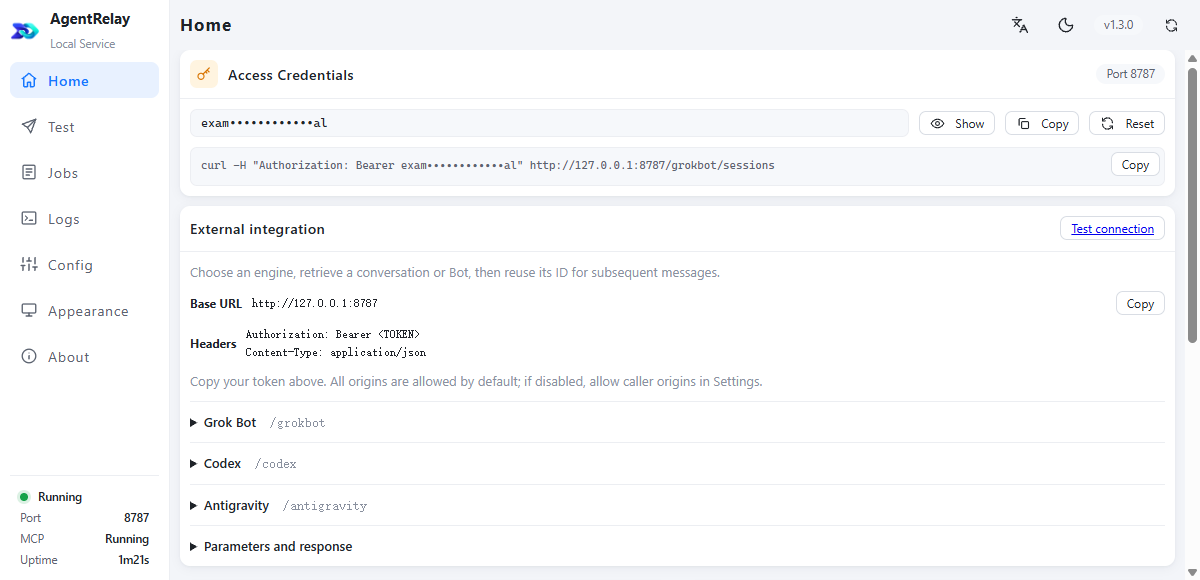
A conversation can already hold your project brief, product details and writing instructions. AgentRelay lets an integrated tool send the next task to that conversation instead of opening another disconnected chat.
AgentRelayOne local connectionConnect your AI clients in one place. Compatible tools use the same session and task interface.
Choose an existing conversation, or explicitly create a new one. Keep a project together across repeated requests.
Check a task by its ID and retrieve its reply. Keep visibility into work that takes longer than one browser request.
AgentRelay supplies the AI connection. Your compatible extension or workflow supplies the schedule, account access and actions. These are workflow patterns, not a built-in autopilot.
Let a scheduled workflow collect the material you choose, send it to a project conversation and save a briefing for the morning.
Choose sources, instructions and a schedule.
A summary, completed results and exceptions to review.
For several X accounts, a compatible operations tool can keep separate briefs and conversations, then prepare account-specific topics and drafts in batches.
Set the audience and content rules for each account.
Distinct drafts and results, tied to the right account.
Send a customer question to a conversation you have prepared with product information and reply instructions. A support workflow can collect results and route exceptions.
Supply the relevant facts and define what can run automatically.
Replies or drafts according to your workflow, with a path to intervene.
The computer and the required AI client must remain available. Account limits and platform permissions still apply. One conversation’s context is not automatically shared with another engine.
A practical starting point
See how to separate the schedule, business context and AI connection—then test a small workflow before you scale it.
XFollower · X operations extension
If you publish on X (Twitter), you also have followers to keep up with, posts worth revisiting and conversations to follow. XFollower is a Chrome extension for creators and product operators that organizes this recurring work in one workspace: account relationships, follow-up queues, posts, authors and writing knowledge.
Track followers and follow-back candidates, manage follow-up queues, and keep posts and authors in view.
Track posts and authors, organize homepage follow-up and keep drafts and processing records alongside the original content.
Bring content analysis and writing experience together so later tasks can use the guidance you have prepared.
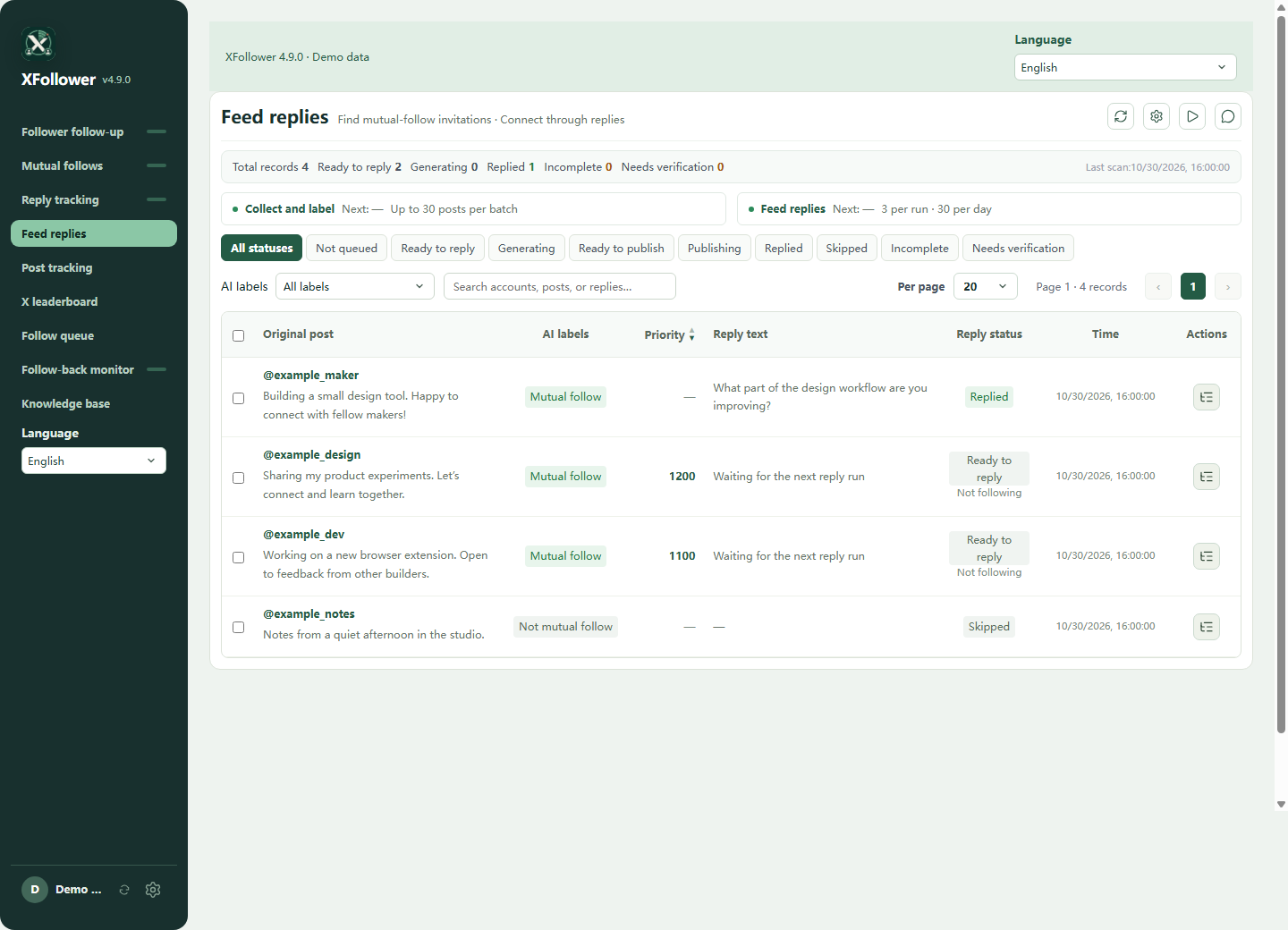
Instead of copying each post into an AI chat and bringing the answer back, let XFollower collect and organize the work. AgentRelay sends AI tasks to the selected conversation; XFollower keeps the classification, draft and follow-up record together.
In XFollower, open System settings → AI engines. Enter the AgentRelay address and token once, choose Grok Bot, Codex or Antigravity, read the conversation list, then test and save.
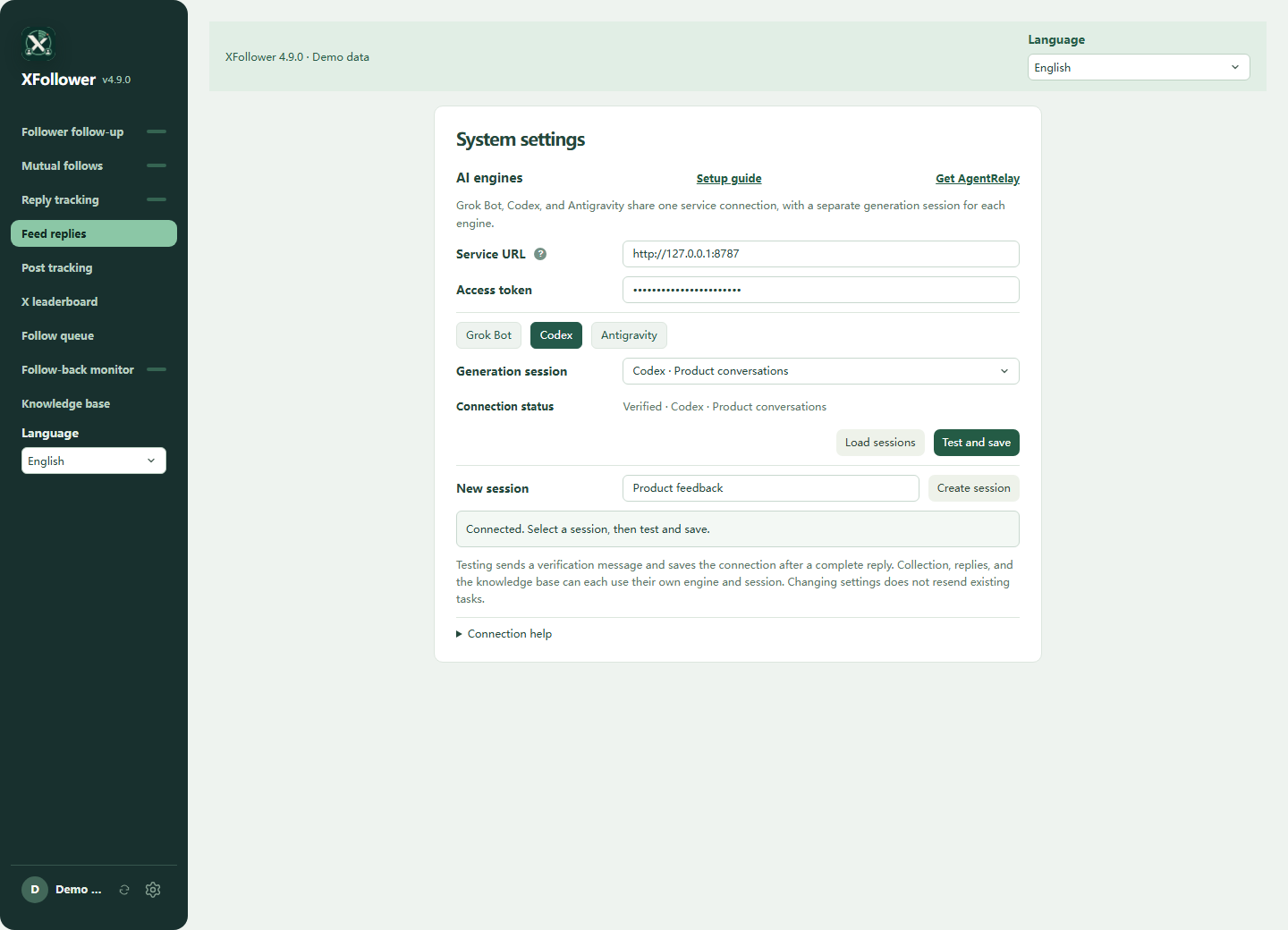
From everyday assistants to coding agents and local models: our vision is one connection that puts more of your AI tools to work.
List conversations, create a new one and continue the same chat.
Choose an existing Bot and send repeated tasks. Refresh the list when needed.
Discover IDE conversations, create a conversation and send follow-up tasks.
Next, a broader ecosystem. These are integration candidates we want to explore, not connections included in today’s download.
Open the installed app to reach the local dashboard.
Open and sign in to a supported AI client. Use the test page to choose a Bot or conversation.
Copy the service address and access token from the dashboard into the tool’s AgentRelay settings. Send a test task, then a follow-up.
Configuration and AgentRelay task records live on your computer. The selected AI service may process prompts in the cloud.
AgentRelay does not sell model credits. It does not turn a subscription into unlimited or universally authorized API access.
Updates wait for active work, back up service data and check the new version. Failed update validation can restore the previous version.
LET YOUR AI CONNECT IT
Give a coding assistant the integration instructions, client and test tools. It can connect your own extension, website or app, bind a conversation and verify the result in your local project.
Keep the complete agentrelay-integration folder and let your AI read it. Codex users can also place it in ~/.codex/skills/.
Start AgentRelay and get the service address from its home screen. Configure the token locally, then choose an engine and existing conversation. Keep the token out of chat.
The AI checks the service, sends a test without external side effects, and verifies continued context, saved bindings after reopening and failure recovery.
Read agentrelay-integration/SKILL.md from the downloaded, extracted folder and connect this project to AgentRelay, following its branch rules. Check the local service first. Let me select an AI engine and an existing conversation, and configure the token securely on this machine, never in source code, chat or logs. Persist the conversation binding and job IDs. Send two harmless test messages to verify context, retained bindings after reopening, and recovery by querying the original job instead of resending. Report actual results and remaining work. Do not commit, publish or operate real social accounts.
Requires a coding assistant that can read local files. The included test tools need Node.js 22+. The skill does not install AgentRelay or include AI accounts or allowances. Grok Bot uses existing bots; Codex and Antigravity allow explicit conversation creation.
They connect different things. Ollama runs or serves models; AgentRelay connects supported AI clients and their conversations so other tools can send tasks.
No. The bridge runs locally. Codex, Grok Bot or Antigravity may use external AI services; their network requirements and data policies still apply.
A tool needs an AgentRelay integration. Installing AgentRelay does not add AI to every extension or website by itself.
A compatible tool can submit scheduled tasks while AgentRelay and the AI client are available. The tool owns scheduling and platform actions; AgentRelay owns the AI connection and task results.
AgentRelay works through supported clients you have signed in to. What you can use depends on the product, plan, permissions and current service terms. Separate API access is not automatically included.
No separate AgentRelay account is required to open the local desktop dashboard. External calls use a local access token; you still sign in to the AI products you use.
Start small. Choose an engine, keep the conversation and let a compatible tool carry the task forward.
Installation & requirements